Showing posts with label GRAPHICS. Show all posts

Wednesday, December 7, 2011

Picture Viewer

THE CODE:-
The whole program is shown below and the output is shown in the figure below:
 Private Sub Image1_Click()
CommonDialog1.Filter = "Bitmaps(*.BMP)|*.BMP|Metafiles(*.WMF)|*.WMF|Jpeg Files(*.jpg)|*.jpg|GIF Files(*.gif)|*.gif|Icon Files(*.ico)|*.ico|All Files(*.*)|*.*"
CommonDialog1.ShowOpen
Picture1.Picture = LoadPicture (CommonDialog1.FileName)
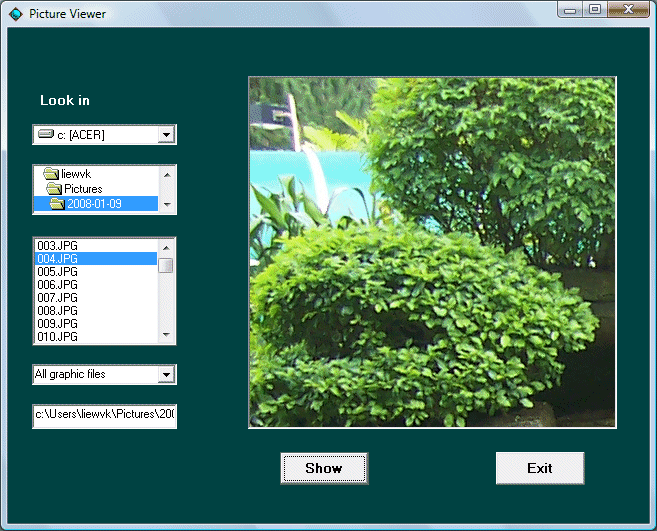
End Sub

A Drawing Program

uses a common dialog box here to perform some of the jobs which could be difficult to perform . In this program, a user have to fill in all the coordinates and choose a color before he can proceed to draw the required shape. If one forget to fill in the coordinates or choose a color, he will be asked to do so.
Private Sub Command2_Click()
x1 = Text1.Text
y1 = Text2.Text
x2 = Text3.Text
y2 = Text4.Text
Picture1.Line (x1, y1)-(x2, y2), color, B
End Sub

Private Sub Command3_Click()
CommonDialog1.Flags = &H1&
CommonDialog1.ShowColor
color = CommonDialog1.color

End Sub

Private Sub Command4_Click()
On Error GoTo addvalues
x3 = Text5.Text
y3 = Text6.Text
r = Text7.Text
Picture1.Circle (x3, y3), r, color
Exit Sub

addvalues:
MsgBox ("Please fill in the coordinates ,the radius and the color")

End Sub

Private Sub Command5_Click()
Picture1.Cls
End Sub

Private Sub Command6_Click()
x1 = Text1.Text
y1 = Text2.Text
x2 = Text3.Text
y2 = Text4.Text
Picture1.Line (x1, y1)-(x2, y2), color, BF
End Sub